Hardware Engineering Pro - Android App
Explore hardware tools, MCQs, formulas, notes and ad-free offline study for electronics learners
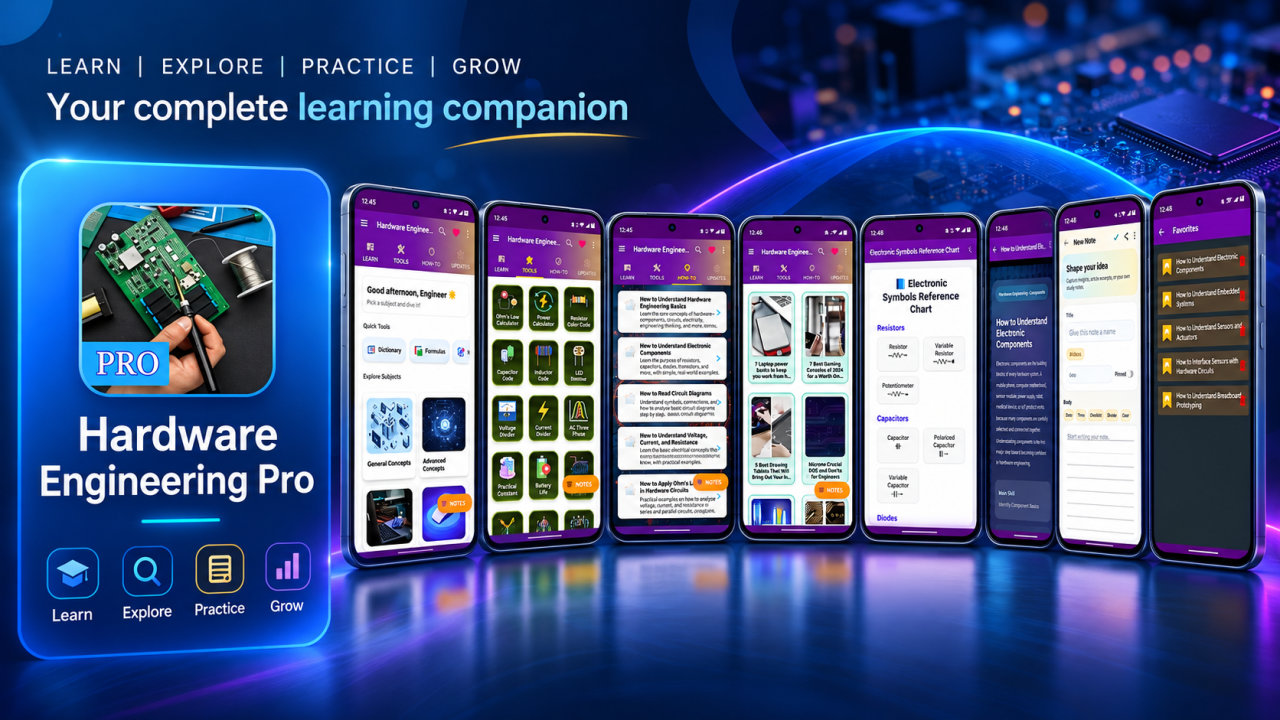
Hardware Engineering Pro is a hardware engineering study and reference app for learning about electronics, computer hardware, circuits and practical calculations. It brings together six subject areas, 58 hardware tools, 30 MCQ practice sets, formulas, notes and reference sections in an ad-free experience. Use its resources to review concepts, explore calculations, look up component information and support your study or revision routine.
Explore six learning areas: General Concepts, Advanced Concepts, Communication Devices, Input Devices, Memory Storage Devices and Output Devices. The app also addresses electronic components, circuits, power systems, digital logic, PCB basics, motors, timers, filters and hardware troubleshooting. Formula and dictionary sections, question-and-answer content and how-to materials provide additional ways to review technical ideas and terminology.
The collection of 58 hardware engineering tools includes calculators, converters and reference resources. For electrical and component topics, examples include Ohm’s Law, Power, LED Resistor, Voltage Divider, Current Divider, RC Time Constant, RL Time Constant and Diode Forward Voltage Drop calculators. Resistor, capacitor, inductor and SMD code decoders help with component-code lookups. An electronic symbols chart, pinout diagrams and quick access to IC datasheets add further reference options.
Explore power and energy tools such as the battery life estimator, UPS/inverter runtime calculator, solar panel sizing tool, cable voltage drop calculator, 3-phase power calculator and power factor correction calculator. Circuit and semiconductor resources include transistor biasing, MOSFET gate charge, Zener diode voltage regulation, 555 timer, op-amp gain, RC filter design, rectifier and LM317 voltage regulator calculators. These tools support learning and exploration of common hardware calculations; they are educational aids, not a substitute for professional judgment.
For digital electronics, use the truth table generator, number system converter, logic gate minimizer, flip-flop state calculator, counter/timer calculator, clock divider and parity bit generator and checker. Communication resources include frequency-to-wavelength conversion, dB, SWR, impedance matching, antenna length, and baud rate and bitrate tools. Other examples include stepper motor step angle, servo PWM duty cycle, DC motor speed, gear ratio, heat sink thermal resistance and PCB trace width calculators, plus electrical unit conversion.
Thirty MCQ practice sets offer a question-based way to check understanding and revisit areas for further review. They can support individual practice, ongoing revision and engineering exam preparation, without promising coverage of a particular examination. Notes, question-and-answer content and how-to materials offer additional ways to work with the app’s learning resources, while formulas and dictionary entries can help when reviewing calculations and technical terms.
Search helps you find resources, and bookmarks let you return to selected material. Offline access supports study with available resources without a continuous connection. Save an article as a PDF or print it for another kind of reference. Light and dark modes provide display choices, and the Pro app is ad-free. Priority support is also included among the listed features.
Hardware Engineering Pro is designed for hardware engineering students, electronics engineering learners, computer hardware learners, diploma and polytechnic students, and people beginning circuit design. Technicians and people learning repair, troubleshooting or digital logic can use it to explore relevant concepts and tools. It may also serve educators, electronics enthusiasts and learners refreshing hardware knowledge for study or reference. Exam candidates can use the MCQ sets as one part of their preparation.
Whether you are reviewing a formula, checking a component code, exploring a logic concept or working through a hardware calculation, the app brings learning and reference resources together. Choose a relevant subject or tool, then use notes, search, bookmarks and practice sets to support self-directed study. Hardware Engineering Pro is an educational reference and does not certify results or replace expert review when decisions require it.
How to install this Android app
- 1After payment, open My Library in your account on your Android phone and download the APK file.
- 2Open the downloaded file. If Android asks, allow "Install unknown apps" for your browser or file manager (Settings → Apps → Special app access).
- 3Tap Install, then open the app. It is yours to keep: one-time purchase, no subscription.
Android phones and tablets only (not iPhone or iPad).
Earn $1.90 per sale
Share this product and earn 50% commission on the price excluding GST for every eligible purchase within your attribution window.
Join affiliate program