Power Electronics Pro - Android App
Ad-free offline Power Electronics guide with notes, search, and bookmarks.
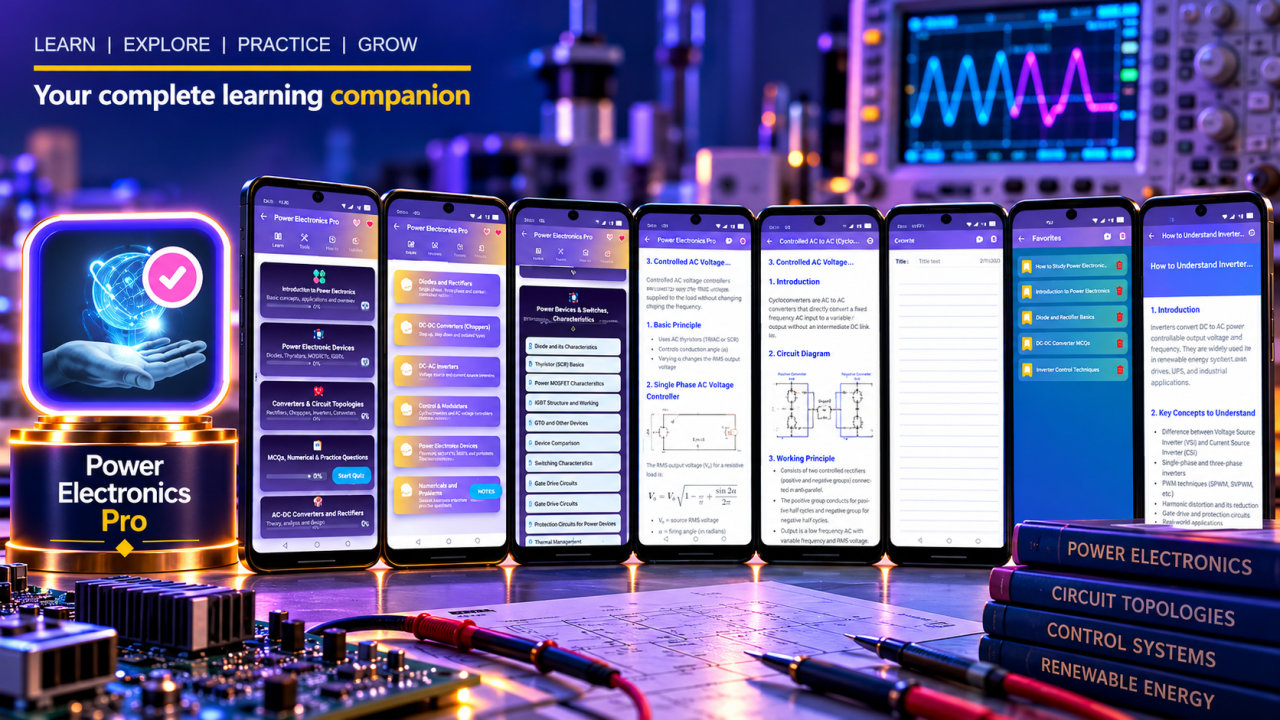
Power Electronics Pro is an ad-free, offline Power Electronics guide for students, engineering aspirants, and practicing professionals who want a portable reference for study and revision. It brings more than 100 indexed study topics together with 10 organized concept categories and 30 guided how-to lessons. Browse the library, search for a specific concept, save pages as bookmarks, and keep personal notes while you learn.
Power electronics connects electronic switching devices with the control and conversion of electrical power. The app’s structured study material moves across foundational concepts and device topics into converter systems and applications. Use it to review terminology, revisit a lesson, or look up a subject that comes up in coursework or independent study. Its organized categories help make a broad technical subject easier to browse, while the indexed topics and built-in search provide a direct way to find relevant reference material.
Explore semiconductor switching devices and their characteristics, including SCRs, TRIACs, BJTs, MOSFETs, IGBTs, and power diodes. These topics provide a reference for learning about the devices used in power electronic circuits and reviewing their place in switching applications. Guided how-to lessons offer step-by-step pages for selected concepts, giving learners a way to work through material in a focused sequence rather than relying only on a broad topic listing.
The converter material includes AC-to-DC conversion and phase-controlled rectifiers, as well as DC-to-DC converters and chopper control. Review inverters and PWM alongside dual converters and matrix converters. Related study areas include AC voltage controllers and cycloconverters. Together, these topics support revision across commonly studied power conversion approaches and provide a convenient way to revisit connected concepts when preparing coursework or reviewing the subject.
The reference also covers snubbers, transient suppression, and protection methods, along with SMPS and solid-state switching applications. For broader system-level reading, explore HVDC transmission concepts. Additional listed topics include GaN devices, thermal design, calibration, and reliability. This range lets readers move between device-level material, conversion topics, protection, applications, and emerging subject areas within one study library. It is a learning reference, not a source of certified design advice or a replacement for professional judgment.
Power Electronics Pro is designed for flexible study sessions. Because the main study material is available offline, readers can consult the library without depending on constant internet access. Built-in search with suggestions helps locate a topic when you have a particular question in mind. Bookmark useful pages to return to during revision, and use the integrated notes workspace to create and maintain personal study notes alongside the reference material. The ad-free experience avoids banner and interstitial ad interruptions while you study.
Electrical and electronics engineering students can use the app to review concepts alongside their learning. Polytechnic and diploma students can browse the organized technical material, while engineering aspirants and competitive exam learners can use the reference for topic review. Teachers and trainers may consult the library while preparing to explain or revisit concepts, and practicing professionals can use it as a portable refresher. The app is also suitable for independent learners who want to explore power electronics topics at their own pace.
Whether you are revisiting a switching device, reviewing converter theory, or organizing notes for a later study session, the app brings search, bookmarks, notes, and an offline reference library into one place. Browse the categories, follow a guided lesson, and return to saved topics when you need them. Install Power Electronics Pro to carry an ad-free Power Electronics study companion on your phone.
How to install this Android app
- 1After payment, open My Library in your account on your Android phone and download the APK file.
- 2Open the downloaded file. If Android asks, allow "Install unknown apps" for your browser or file manager (Settings → Apps → Special app access).
- 3Tap Install, then open the app. It is yours to keep: one-time purchase, no subscription.
Android phones and tablets only (not iPhone or iPad).
Earn $1.90 per sale
Share this product and earn 50% commission on the price excluding GST for every eligible purchase within your attribution window.
Join affiliate program