Project Management Pro - Android App
Project management tools, offline learning, 30 MCQ sets, PDF support and an ad-free experience.
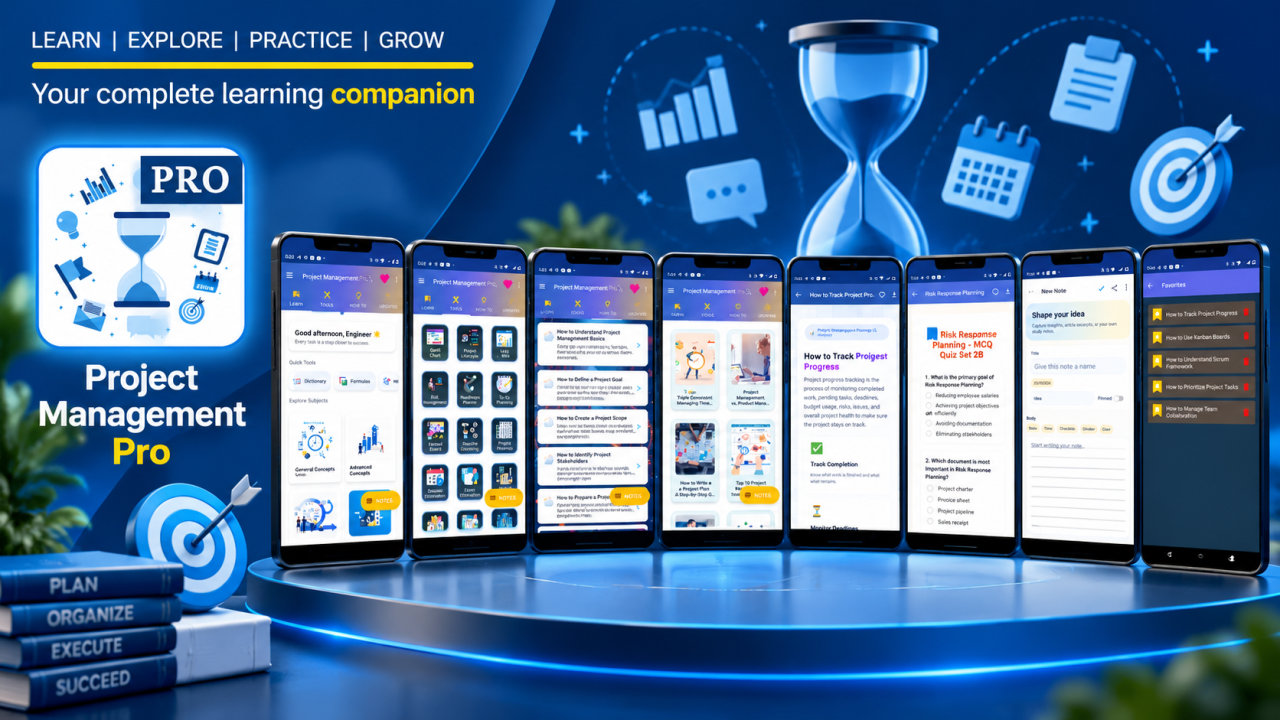
Project Management Pro brings project management learning materials, MCQ practice, reference resources, and practical planning utilities together in one app. It is designed for people who want to study core project concepts, review Agile and risk topics, explore project-related calculations, or keep useful project resources available during day-to-day work. Offline access supports learning away from an internet connection, while the ad-free experience keeps the focus on the material.
The learning collection is organized across 10 subject areas. Begin with general concepts or explore advanced concepts, then review Agile Project Management and the financial and risk aspects of projects. Other subjects cover project governance and monitoring, people management, project management for IT professionals, and project management for non-IT professionals. Dedicated topics address project management with MS Project and risk assessment and management. This range offers different entry points for learners, whether they are building familiarity with project terminology or revisiting a particular area.
Subject-wise questions and answers, detailed how-to tutorials, and 30 MCQ sets provide ways to review the material. Use the project management dictionary to look up terminology and the formulas and calculations reference to revisit quantitative concepts. Notes and bookmarks help you keep track of material you want to return to, and smart search helps locate relevant content. Articles can be saved as PDFs or printed for later reference. Light and dark themes offer display choices, and the app listing notes regular updates.
The app includes 30 project management tools covering planning and scheduling, Agile and task management, risk and analysis, financial and performance calculations, documentation, and governance. Planning resources include a Gantt chart generator, project timeline creator, critical path calculator, PERT calculator, and roadmap planner. For task coordination, the collection includes a Kanban board, a to-do list with progress, a task effort estimator, a workload balancer, and a team communication board.
Risk and analysis tools include a risk matrix, SWOT analysis generator, stakeholder analysis tool, and risk cost estimator using EMV, alongside a cost-benefit analysis tool. For financial and performance work, the listing identifies a project budget estimator, EVM calculator, ROI calculator, resource allocation calculator, and progress dashboard. Documentation and governance resources include a project charter generator, meeting minutes recorder, lessons learned recorder, quality checklist tool, and issue tracker. The app describes these as part of a 30-tool collection, with additional productivity-focused utilities.
These resources can support different study routines and general project planning tasks. A learner might read a tutorial, check a dictionary term, and then use MCQs to review the related subject. Someone organizing project work may refer to scheduling or task tools, while a student reviewing project costs can explore the relevant formulas and financial utilities. Notes and bookmarks make it possible to mark topics for follow-up; PDF saving and printing provide another way to keep articles accessible. Offline access can be useful for reading when a connection is unavailable.
Project Management Pro is intended for project managers, Scrum Masters, Agile teams, business analysts, operations managers, entrepreneurs, and startup teams, as well as IT and software professionals. MBA and engineering students can use its learning resources to explore project management topics. The listing also identifies PMP and CAPM preparation as use cases, alongside learning for IT and non-IT project professionals. It is an educational and planning resource, not a promise of examination results or professional accreditation.
The Pro app is ad-free and includes notes, PDF saving or printing, full access to all 30 MCQ sets, and priority support. The listing describes the purchase as one-time, with no subscription. Explore project management concepts at your own pace, review topic-based questions, and use the available tools as learning and general planning aids. Apply appropriate professional judgment when using calculations or utilities for real project decisions.
How to install this Android app
- 1After payment, open My Library in your account on your Android phone and download the APK file.
- 2Open the downloaded file. If Android asks, allow "Install unknown apps" for your browser or file manager (Settings → Apps → Special app access).
- 3Tap Install, then open the app. It is yours to keep: one-time purchase, no subscription.
Android phones and tablets only (not iPhone or iPad).
Earn $1.90 per sale
Share this product and earn 50% commission on the price excluding GST for every eligible purchase within your attribution window.
Join affiliate program